How to Change Your Exam Date in Vantrel
If your exam moves, change the date on the Exams tab. Your countdown and study plan follow the new date straight away.
How to Change Your Exam Date in Vantrel
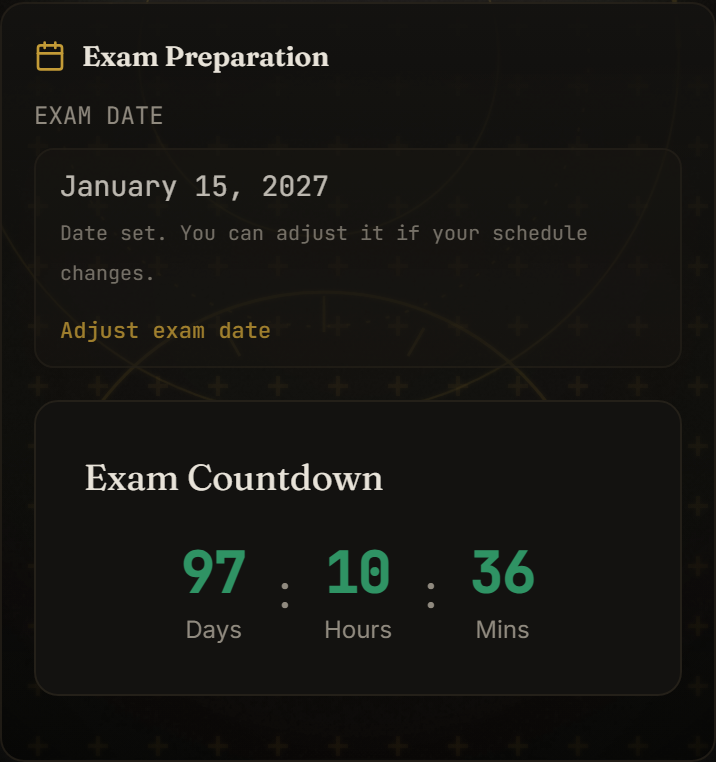
Exam dates move. A certification body reschedules, or work leaves you needing another month. When that happens, change the date in Vantrel as well, because your countdown and your study plan are both worked out from it.
The date you picked when you signed up isn't fixed. You can change it from the Exams tab at any point before your exam.
Before you start
Vantrel keeps a separate date for each exam you study. If you're preparing for more than one, use the exam switcher at the top of the screen to select the exam that has moved first. Changing your CDPO date leaves your CAMS date alone, and the other way round.
Change the date
- Open the Exams tab. On a phone it's in the bar along the bottom of the screen. On a laptop it's at the top.
- Find the Exam Preparation card. Your current date is shown under EXAM DATE.
- Select Adjust exam date, just below the date.
- Pick the new day in the date field. On a phone, this opens your phone's own calendar.
- Select Save date. If you change your mind before saving, Cancel puts the old date back.
Vantrel shows "Exam date updated." when it saves, and the line under EXAM DATE changes to the new day.
If you're preparing for CIA
CIA has a date for each part. The Exam Preparation card lists your parts one under the other, labelled P1 EXAM DATE, P2 EXAM DATE and so on, and each one has its own Adjust exam date link. Change the part that moved and leave the others as they are. Your countdown always follows the next part you're due to sit.
Picking the new date
Use the day you're actually booked to sit, not a rough target. The earliest date you can pick is tomorrow. If you enter an earlier day, Vantrel says so and keeps your current date.
What changes after you save
The Exam Countdown card counts down to the new date, and your study plan on the Study tab is rebuilt around it. Nothing else needs updating.
Your profile page also shows your CDPO exam date, but you can't edit it there. Changes always go through the Exams tab.
If the Adjust exam date link isn't there
The link only shows while your exam is still ahead of you. Once the date has passed, Vantrel asks how your exam went instead.
If you didn't pass, choose I Didn't Pass, then pick your new date under RETAKE EXAM DATE. It has to be at least a week from today. Select Create Study Plan and Vantrel builds a retake plan around that date.
If you passed, there's nothing to reschedule.
If it still shows the old date
Make sure you selected Save date. Closing the page while the date field is still open throws the change away.
Check that the exam switcher shows the right exam. Each exam has its own date, so it's easy to edit one while looking at another.
If Vantrel shows "Your latest changes couldn't be saved", check your connection and change the date again.
Wait a few seconds and refresh. Vantrel stores the change shortly after you select Save date, so refreshing straight away can bring back the old value.
If the old date keeps coming back, contact support. Tell them which exam it is and the date you're trying to set, and they can check it for you.
Related guides
Keep building exam readiness
If this article helped clarify the path, the next step is to turn insight into practice. Explore the platform, choose your exam track, and start preparing with structure.